
My last task at Virgo was updating our inbox feature to have local read/unread support. Since Virgo doesn't have proper local data fetching, I was joking around that I needed 3 weeks to complete the task. I actually only needed 1 week to complete it without changing any core/architecture components on our project. So for the next 2 weeks, I was actually trying to create a proper library to support local, offline-first data fetching since I believe it will benefit us in the long term (we had a lot of network-related data fetching issues that were lingering for months, even years). While my changes on inbox may get shipped someday in the future, my library definitely will not see the light of day since I no longer have access to the project anymore and can't implement the changes. But, since the library is pretty much usable, I think I can share the write-up on my attempt to solve this.
"Offline-first" application
"Offline-first" or "network-resilient" jargon is something that I've seen quite often recently. Even Google has its own dedicated guide to implement offline-first data architecture for your app. Personally, I do think implementing offline-first data architecture for your app is somewhat useful, especially if your app can operate without an internet connection, or your data can be stored locally on the user's device, reducing unnecessary requests to your backend.
But this architecture is a foreign concept in Virgo since pretty much all of our data is straight from the backend. While some of them need to be updated in real time to make sure users see the latest data (user balance, cashout denom, digital goods items, etc.), some of them can benefit from implementing offline-first data architecture. Things like feature flags, inbox, or server-driven UI layouts are some of the things that don't need to be fetched every time a user opens a new screen. It can be fetched once per session, stored locally, and used instead. But no, we like to fetch everything from the backend, even though we know it will be redundant or might result in users not seeing the content because of network issues. This is my motivation when implementing changes on the inbox: we can create a library to handle the pain of implementing local-first data fetching and network data refresh once, then use it in multiple features on Virgo.
Making Laika, offline-first data architecture library
Now let me introduce my attempt to solve that, Laika. Laika is a Kotlin Multiplatform library I made that lets you create an offline-first app without needing to manually handle the stuff. The goal is basically trying to handle data feeding to your app, just let Laika know how to fetch the data from the network and how to store it to your local and Laika will handle the orchestration for you. So, let's try to see how it works!
Disclaimer: since I no longer have access to Virgo, I will use my personal project to demonstrate Laika while trying to mimic what the initial usecases.
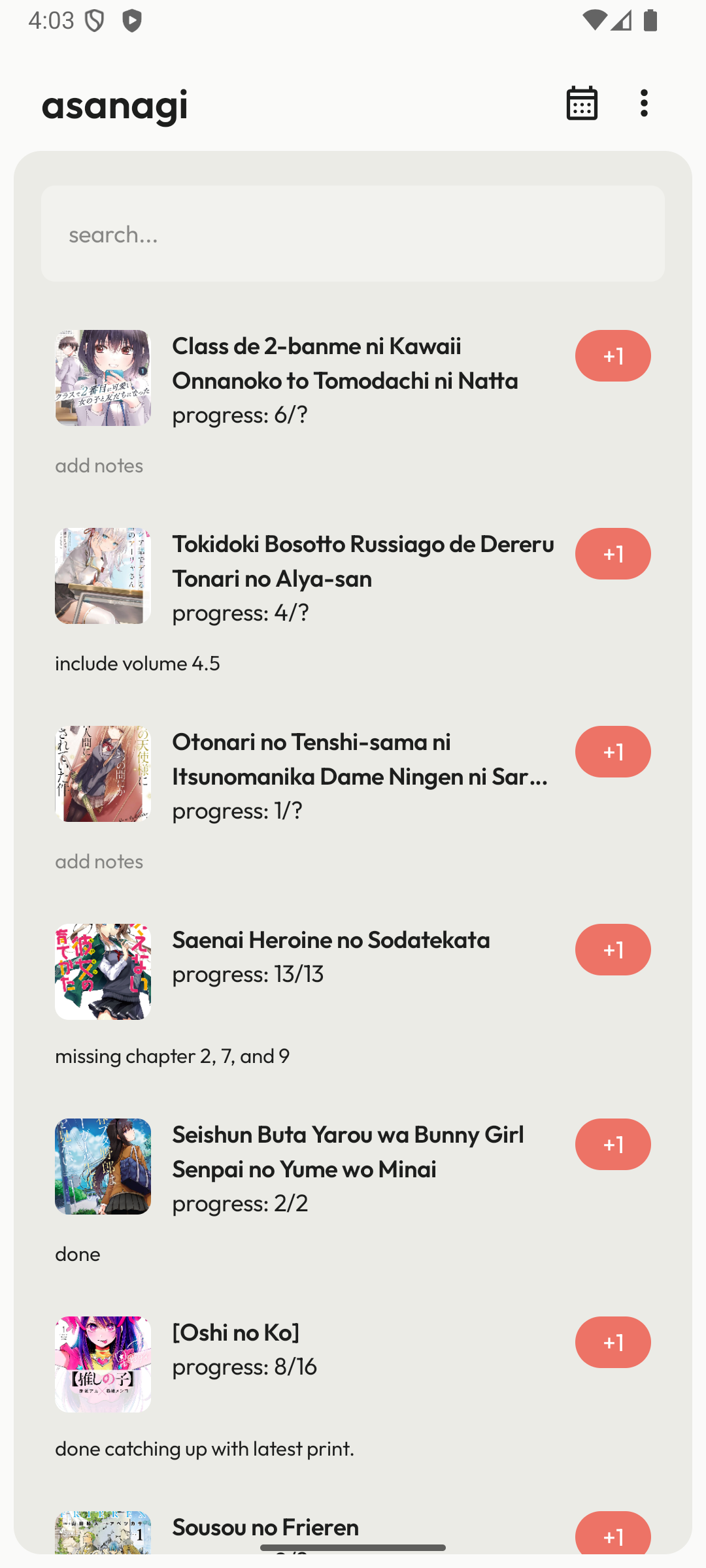
I will use my other project to demonstrate the library in action. This app is my book collection manager that fetches my collection from my server and stores it locally so I don't need to worry when I somehow lose an internet connection.
Delegating "everything" to you
My initial attempt was very tied to the tech stack that Virgo uses, stuff like Protobuf for data serialization, SQLDelight and Hawk for persistent local storage, and gRPC for network fetching. But then I struggled to use it on my own project since none of them are my go-to tech stack when building an app. So I decided that everything related to data fetching and storing is created as loosely as possible and let the user decide how they will fetch the data and store it.
Abstracting remote and local data source
Let's think of a general view about data sources. Generally, remote data sources are the ones that handle fetching data from the backend. Then the data will be consumed by the app, then stored to the local data source. We need a way to store, update, and potentially delete the data from the local to make sure we have synced data with the fetched data from the remote. Laika abstracts it in this way:
public interface RemoteSource<T : Any> {
    public fun fetch(key: Any): Flow<Result<T>>
}
RemoteSource expose fetch with key as parameter, this will give the user the ability to handle how the data was fetched. For example, we can just directly call the Retrofit's service or if we have a network repository layer, you can just call it and map it to Result:
RemoteSource.create { _ ->
    when (val result = networkDataSource.fetchCollections()) {
        is NetworkResponse.Success -> Result.success(result.data)
        is NetworkResponse.Failure.Error -> Result.failure(Exception(result.payload.toString()))
        is NetworkResponse.Failure.Exception -> Result.failure(result.throwable)
    }
}
It's the same thing as the LocalSource, it gives you basic create, read, and delete functionality that you can use with whatever your persistent storage library is:
public interface LocalSource<T : Any> {
    public fun get(key: Any): Flow<T?>

    public suspend fun create(key: Any, value: T)

    public suspend fun delete(key: Any)
}
For example, using DAO's from Room:
LocalSource.create(
    get = { _ -> collectionsDao.getCollections() },
    create = { _, entities -> collectionsDao.upsertCollections(*entities.toTypedArray()) },
    delete = { _ -> collectionsDao.deleteAllCollections() },
)
As some of you noticed, the functions actually passed key but in my examples it's not being utilized since you can just straight skip it if you don't need it. It’s actually helpful if you need to fetch or get the data that requires an identifier when fetched or stored, for example get collection by its id:
LocalSource.create(
    get = { key -> collectionsDao.getCollection(key as Int) },
    create = { _, entity -> collectionsDao.upsertCollection(entity) },
    delete = { key -> collectionsDao.deleteCollection(key as Int) },
)
RemoteSource.create { key ->
    when (val result = networkDataSource.fetchCollection(key as Int)) {
	...
	}
}
Mapping the models
Now in Virgo, we really like to overcomplicate our model. By that, I mean overcomplicating it is that we have 3 (or more sometimes) different ways to define a single model, mostly to split the network model and UI model since we sometimes do additional mapping, or even fetching other models to construct a single UI model. So, both UI, network, and local models need to be mapped. I initially used Protobuf to manage serialization/deserialization of the models, but again fell into the same issue as the data sources above and decided to delegate it to the app so that the user has control over the data mapping.
public interface DataMapper<Local : Any, Remote : Any, T : Any> {
    public fun mapRemoteToLocal(remote: Remote): Local

    public fun mapRemoteToData(remote: Remote): T

    public fun mapLocalToData(local: Local): T
}
There are three components here:
- Map remote model to local model is used to directly store the fetched data to the local.
- Map remote model to UI model is used to map remote model to the UI model (in case we want the network result also streamed to the UI).
- Map local model to UI model is used to map local model to the UI model, since our local model is the de facto source of truth of the UI.
With this, users now have full control on how they want to store the fetched data, or even how the models will be streamed to the UIs.
Combining everything
Now that's what we need to create Laika, the remaining tasks is to combine everything and utilize it to our data layer.
LaikaBuilder.builder()
	.addLocalSource(localSource)
	.addRemoteSource(remoteSource)
	.addDataMapper(dataMapper)
	.build()
LaikaBuilder.build() will return Laika, that exposes a Flow of the data stream wrapped in a LaikaResult sealed interface.
public interface Laika<T : Any> {
    public fun fetch(key: Any, localOnly: Boolean = true): Flow<LaikaResult<T>>
}
fetch function requires key that passed to the network and local data source, and localOnly boolean, that used if you want the data streamed from Laika is always from local or you want to have network's fetch result to be streamed. This will ensure the user to have a way to handle network loading state or failure state, if any.
LaikaResult is the wrapper to the data that exposes the state of the streamed data (Loading, Success, or Failed), while also exposes where the data is coming from.
public sealed interface Source {
    public data object Local : Source
    public data object Remote : Source
}

public sealed interface LaikaResult<out T> {
    public val source: Source

    public data class Loading(override val source: Source) : LaikaResult<Nothing>

    public data class Empty(override val source: Source) : LaikaResult<Nothing>

    public data class Success<T>(override val source: Source, val data: T) : LaikaResult<T>

    public data class Failure(override val source: Source, val error: Throwable) : LaikaResult<Nothing>
}
Behind the scene, Laika actually does combining both of the flows from the network and the local data store, handling the storing of data to the local when fetching from the network is successful, and wrapping them in LaikaResult. I had a drawback when trying to combine both flows since merge and combine are not something that I want (merge requires both flows to be of the same parameterized type, while combine, well "combine" those two into a zipped type). But on a quick discussion with ChatGPT, I found out that you can use something like channelFlow, collect both flows (which is helped by channelFlow builder since it may run on different contexts or concurrently), and wrap/transform it into LaikaResult.
private fun createStream(key: Any, localOnly: Boolean): Flow<LaikaResult<T>> {
    val localStream = localSource.get(key)
    val networkStream = remoteSource.fetch(key)
	    .onEach { response ->
	        response.onSuccess { data ->
	            val mapped = dataMapper.mapRemoteToLocal(data)
	            localSource.create(key, mapped)
	        }
	    }
	    .map {
	        it.fold(
	            onSuccess = { data ->
	                val mapped = dataMapper.mapRemoteToData(data)
	                LaikaResult.Success(Source.Remote, mapped)
	            },
	            onFailure = { throwable ->
	                LaikaResult.Failure(Source.Remote, throwable)
	            }
	        )
	    }
	    .onStart {
	        emit(LaikaResult.Loading(Source.Remote))
	    }

    return channelFlow {
        launch {
            localStream.collect {
                if (it != null) {
                    val mappedValue = dataMapper.mapLocalToData(it)
                    send(LaikaResult.Success(Source.Local, mappedValue))
                } else {
                    send(LaikaResult.Empty(Source.Local))
                }
            }
        }

        launch {
            networkStream.collect {
                if (!localOnly) send(it)
            }
        }
    }
}
As you can see, localStream is the first-class citizen here, always streamed to the downstream so the user will always have it firsthand. On the other side, networkStream will be streamed to the downstream when the user sets localOnly to false. But every streamed success data from networkStream will be used to fill the local storage via localSource.create. With this, we can combine both network and local flow while having control over what data source we want to stream.
Laika in action
Using Laika is pretty simple, take a look at the example:
@Singleton
class LaikaBackedRepository @Inject constructor(
    @Named("collectionsLaika") private val collectionsLaika: Laika<List<Collection>>,
    @Named("collectionLaika") private val collectionLaika: Laika<Collection>
) {
    fun collectionsFlow(): Flow<LaikaResult<List<Collection>>> = collectionsLaika.fetch(Unit, false)
        .onEach { Log.d(this::class.simpleName, it.toString()) }

    fun collectionFlow(id: Int): Flow<LaikaResult<Collection>> = collectionLaika.fetch(id)
        .onEach { Log.d(this::class.simpleName, it.toString()) }
}
We just need to call the fetch function and passed the data to the UI layer. I've put a log there to see how it works in real app. Back to my example app, let's see how's the stream looks like:
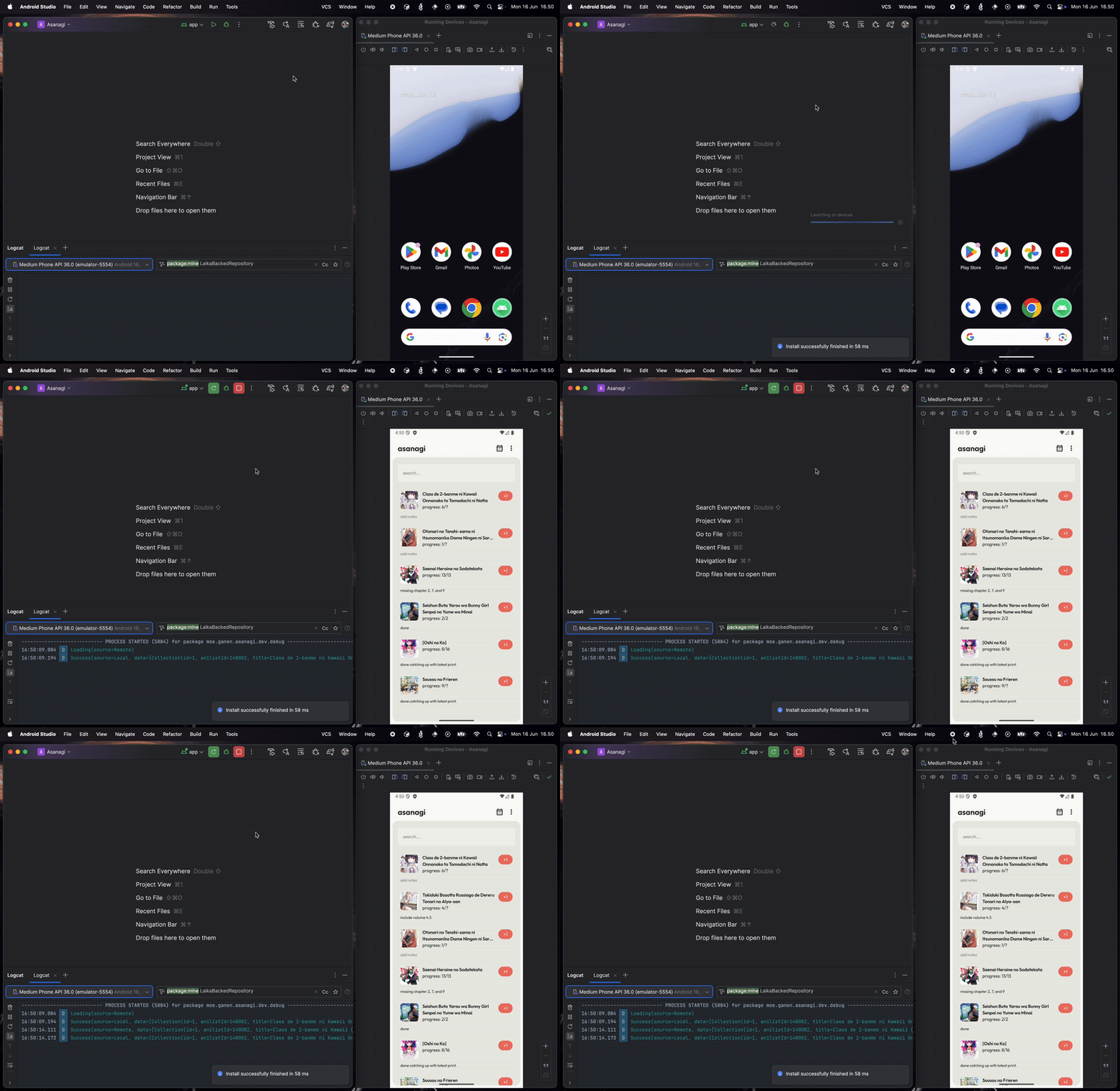
As you can see, it first fetches and displays the data from local, while also fetching the data from the network. When the network is done fetching the data, it will stream to the UI while also updating the local, syncing the local source, then stream it to the UI. It's a bit redundant to have both remote and local source streaming the same data, but it can be improved later.
Now let see what happened if the network failed to fetch or no network:
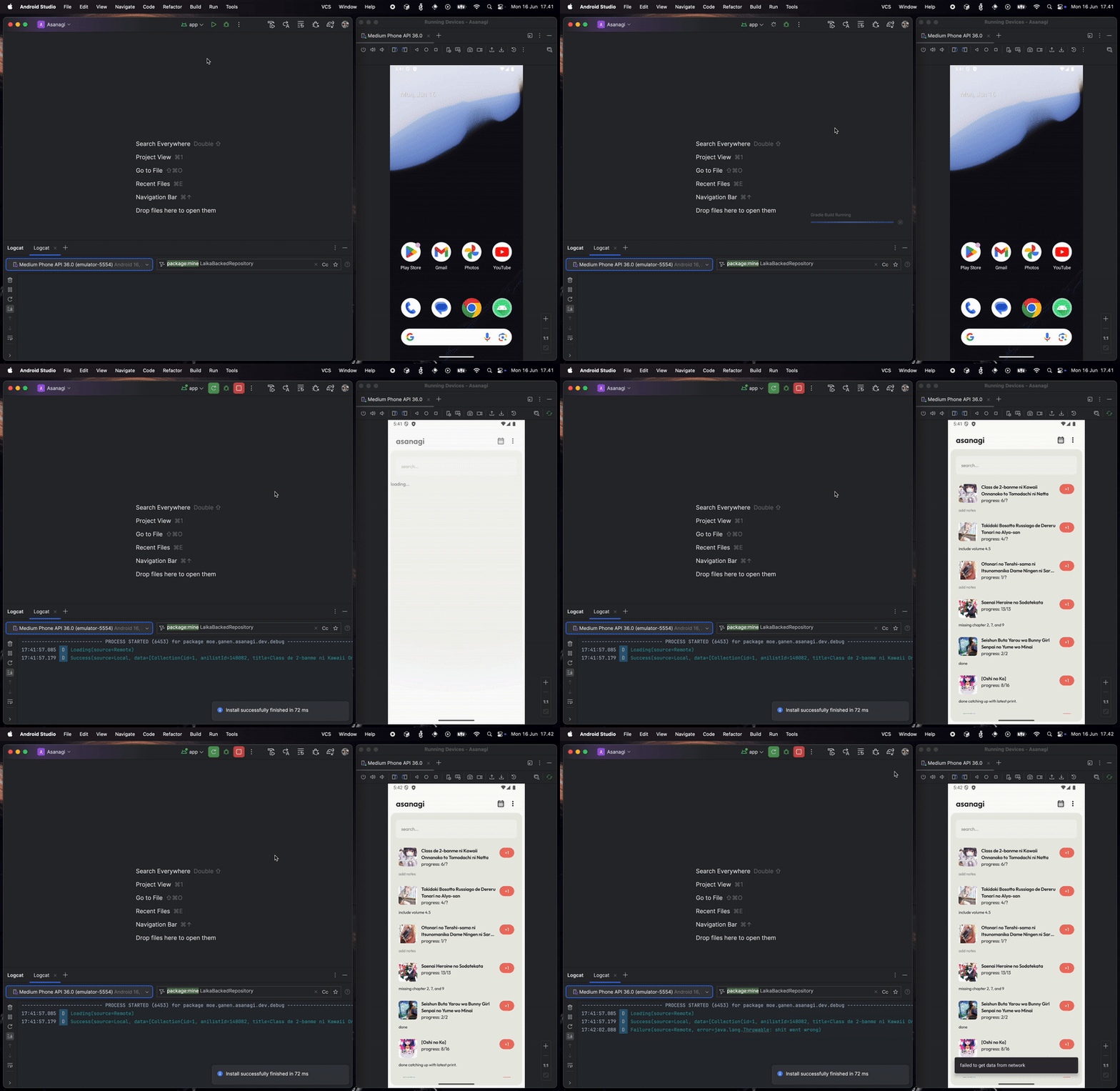
As you can see, since we set localOnly to false when creating the stream, we can collect network fetch status and display the appropriate feedback to the user. This is very useful, especially in Virgo where we have multiple ways of displaying errors depending on the network failure, even if the data was fetched from the local. With this, we successfully create a local/offline-first app, where local data is the main source of truth, backed with the data from the network.
Closing
While it successfully implements the things for supporting offline-first apps, it is still far from perfect. There are possible edge cases that may happen, things like read-write race conditions, unnecessary duplicate data streams as I mentioned above, and data mutation support that requires network requests. But overall, I am really satisfied with how it turned out and how useful this library is for me. At the very least, this is something that hit my standard of how the data layer architecture should be in Virgo.
It's a bit sad to think that this thing will not see action in the intended application that I made for it. But even then, the fact that I can utilize it for my own project is very satisfying enough for me. But well, it is what it is. /shrug
I will probably share the GitHub link for both Laika and the example app once I am satisfied with the APIs, no guarantee though.